
User guide › Calls & SMS
TripTok Calling Guide
How to make and receive calls in the app, get a number, and what it costs, step by step.
1About TripTok Calling
TripTok Calling is not your phones built-in dialer. It is an internet call over data or Wi-Fi. Use it from the Call tab at the bottom of the app, and you can call with credits even without an eSIM. Buy an unlimited eSIM' and you can use free calling.
- Pick a country, dial the number, and call anywhere in the world.
- Choose your caller ID: the shared number, your verified Korean number, or a TripTok number you got in the app.
- To receive calls and texts, you need a TripTok number.
- Calls between TripTok users are free app to app.
- You need data or Wi-Fi and microphone permission.
Your verified Korean 010 number cannot receive calls in the TripTok app. Calls to your 010 number ring on your Korean SIM in the phone's default dialer.
2Before you start
Make sure these four things are done before calling. Skip ahead if you already have.
- 1
- 2
Sign up and verify your phone number
The verified number can be used as your caller ID, but calls to it do not ring in TripTok.
- 3
If you bought on Naver, Coupang, MyRealTrip or another store, link the order to your account
Use Import my orders on the My data screen or the banner at the top of the Call tab. Purchases made in the TripTok app or website are already linked.
See how to link - 4
On arrival, turn on the eSIM and mobile data
Free calling unlocks after the unlimited eSIM is activated locally. Calls work over Wi-Fi too, but the free benefit needs activation first.
See the arrival setup guide
3How to use
Follow the app screens in order. Screens are from Android; iPhone works the same.
Check your free-call benefit
If you bought on Naver, Coupang, MyRealTrip or another store, link the order first. Purchases made in the TripTok app or website are already linked.
- 1
Tap the banner at the top of the Call tab
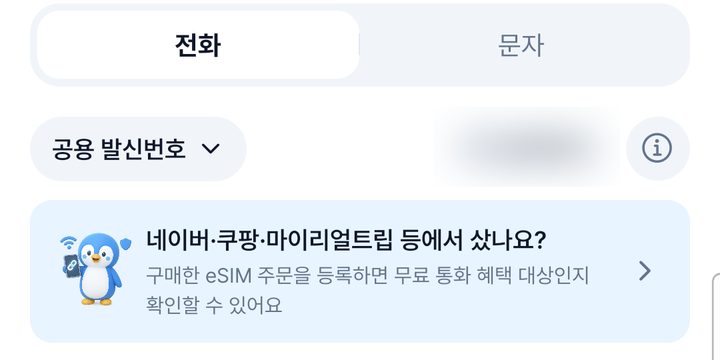
- 2
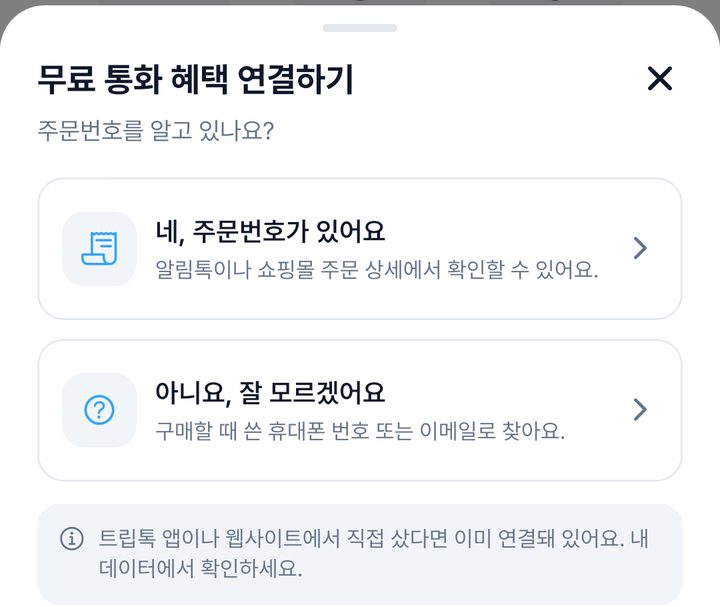
Choose whether you know your order number
You can find the order number in the KakaoTalk notification or the store's order details.
- 3
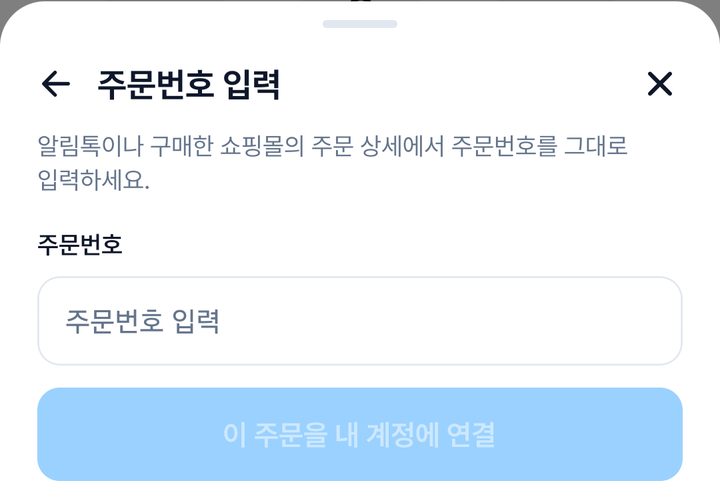
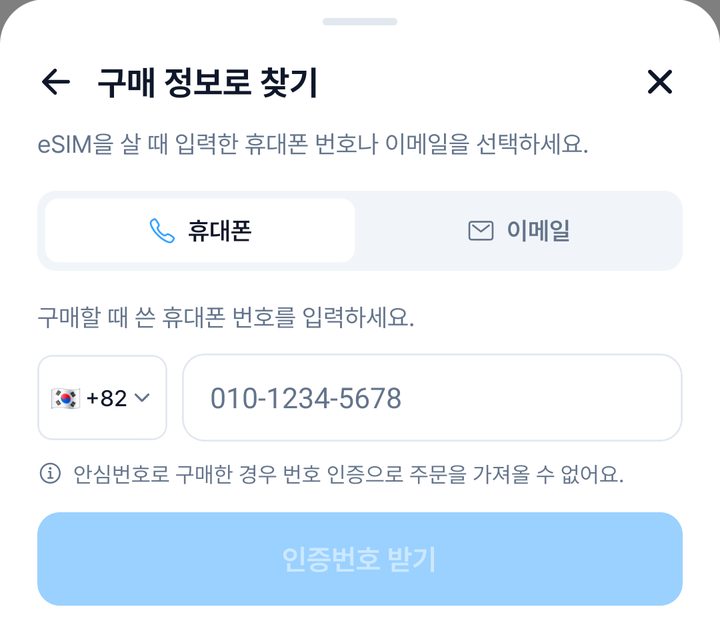
Enter the order number, or find it with the phone or email used at purchase
Once linked, your free minutes appear on the Call tab.
Linking an order does not make every product free. Check the remaining minutes shown in the app.
Making a call
- 1
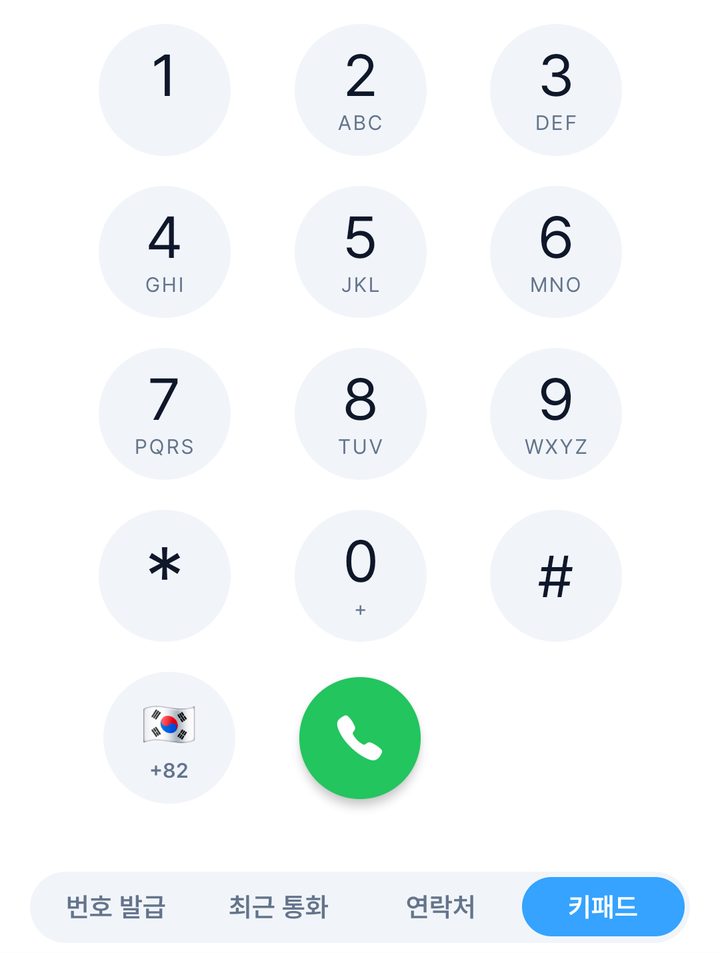
Tap the flag to pick the other person's country first, then dial
Once the country is selected, do not type the country code again. For Korea +82, enter the number starting from 010.
- 2
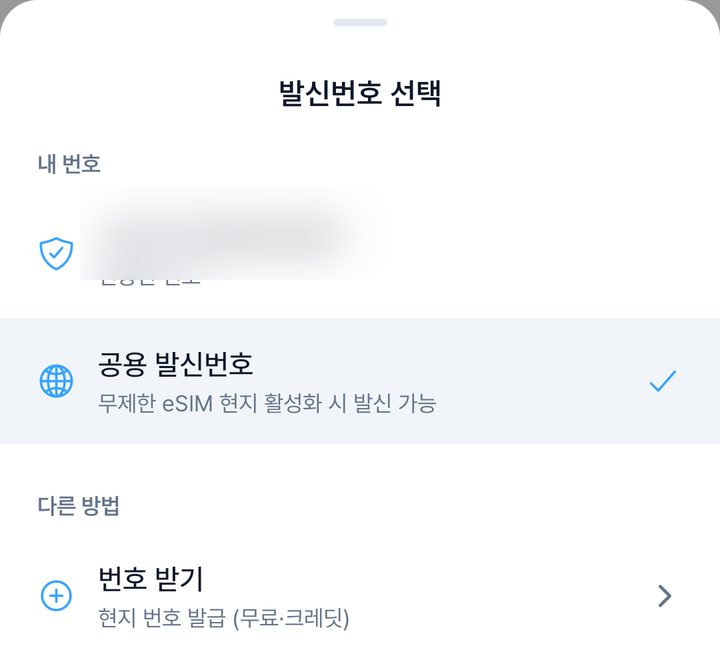
Tap Caller ID at the top to choose the number the other person sees
The shared number works right away, but if they call back it will not reach you.
- 3
Tap the green call button
The call goes through international networks, so it may take a moment before it rings.
The other person may see an international number or hear a carrier message. Let friends know in advance so they pick up.
Caller ID options
The number you call from decides what the other person sees and whether you can receive calls.
| Shared number | Available immediately. Outgoing only, so you cannot receive calls or text replies. |
|---|---|
| Verified Korean number | Shows your own 010 number. Calls to it ring in the phone's default dialer. |
| TripTok number | Call from a local number and receive calls and texts in the TripTok app. |
Who can call whom
Whether a call connects, and what the other side sees, depends on who is calling.
| Me abroad → friend in Korea | Works. Your friend sees the caller ID you chose, shown as an international call. Let them know in advance. |
|---|---|
| Friend in Korea → me abroad | Rings in the app only when they call your TripTok number. Calls to your 010 number go to your Korean SIM. |
| TripTok user to TripTok user | Free when both connect through the app. If the other side cannot take app calls, it falls back to a regular call. |
| Texts | Replies arrive only on a TripTok number, and texts cannot be sent to Korean numbers. |
Getting a phone number
If you need to receive calls or text replies, get a number for the country you will use.
- 1
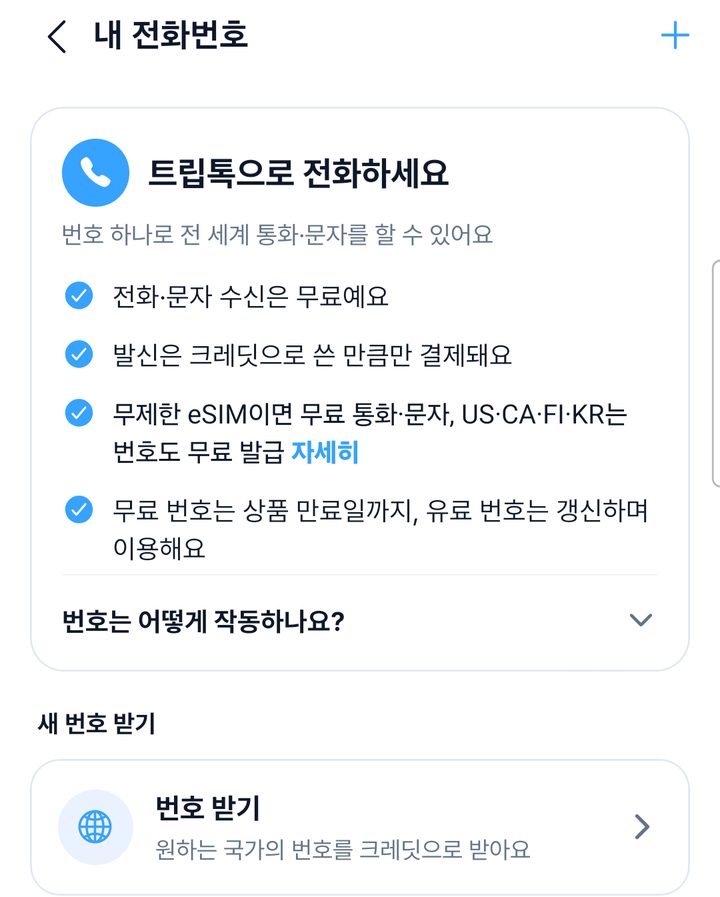
Tap Get a number under Numbers in the Call tab
- 2
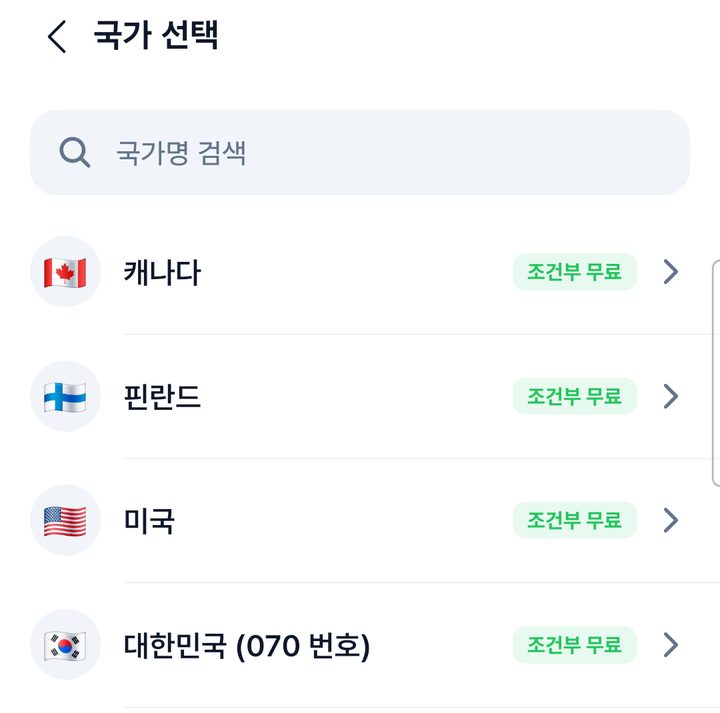
Choose a country
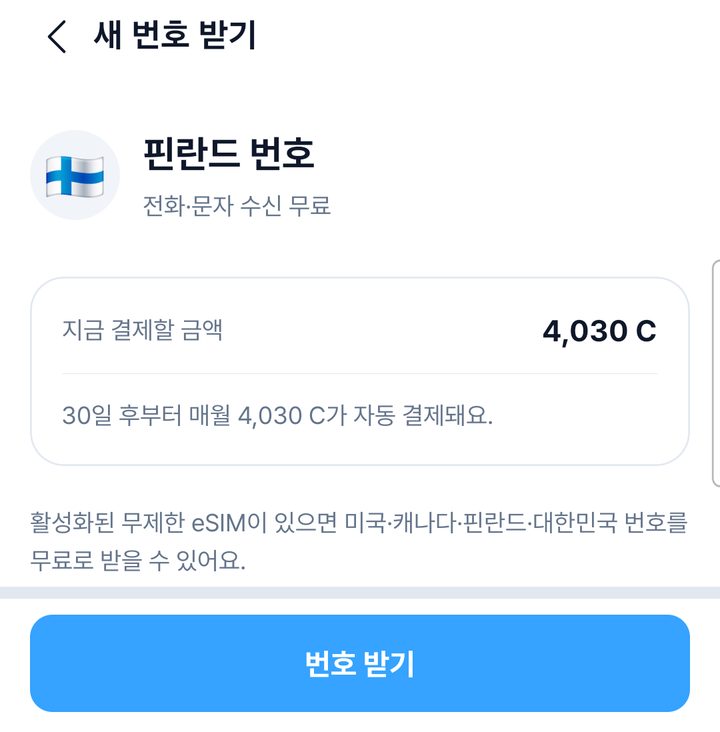
Countries marked 'Free with plan' are free if you have an active unlimited eSIM.
The free number is one of US, Canada, Finland, or Korea 070, limited to one per person and one per eSIM. It is returned when the plan expires.
- 3
Check the setup fee and monthly rent, then tap Get number
If the free conditions are not met, the price is shown in credits.
Sending texts
- 1
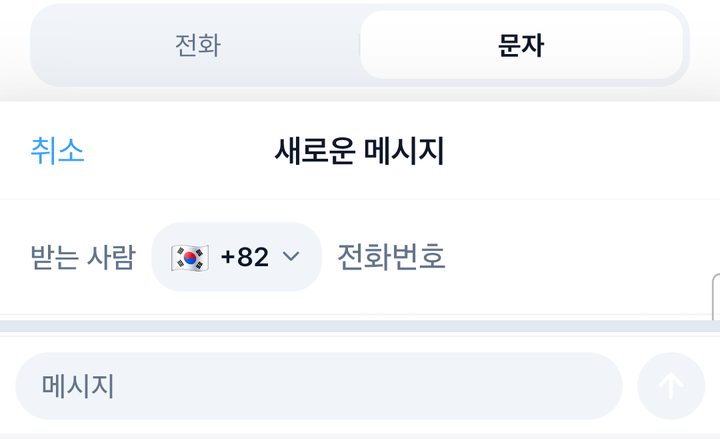
Open SMS at the top of the Call tab, start a new message, and enter the country and number
Type your message and tap the arrow on the right to send.
- 2
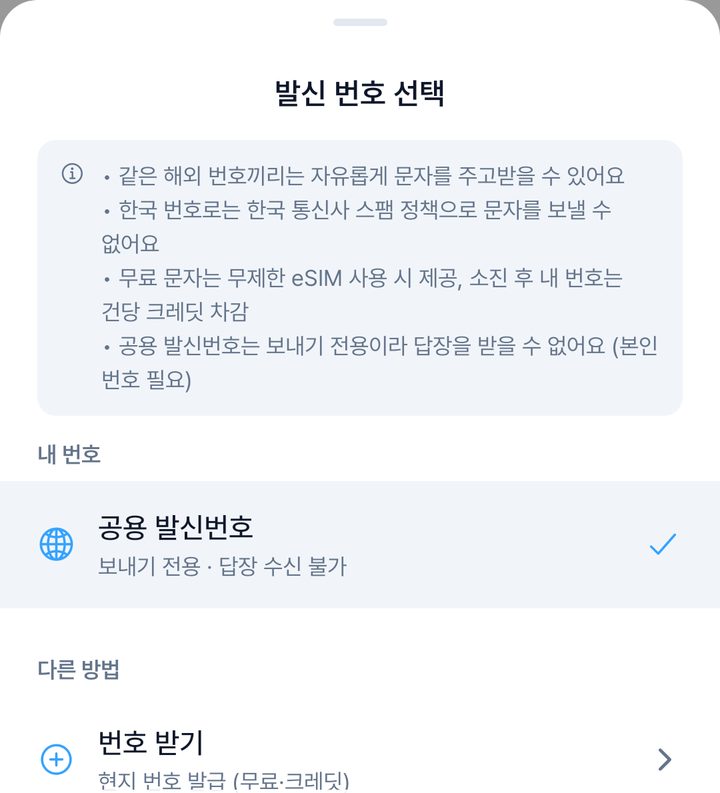
To get replies, switch the sender to My TripTok number
Texts sent from the shared number cannot receive replies.
Texts to Korean numbers are not supported because of Korean carrier spam policies.
Rates
| Free calling | Included when you buy an unlimited eSIM. It unlocks once the eSIM is activated locally, and the remaining time is shown on the Call tab. |
|---|---|
| Credit calls | When free minutes run out or you have no eSIM. Per-minute rates vary by country and landline/mobile. |
| Phone number | Separate from call rates. Unless free conditions are met, a setup fee and monthly rent apply. |
| Credit refunds | Unused paid credits can be refunded through customer support minus a 10% fee. |
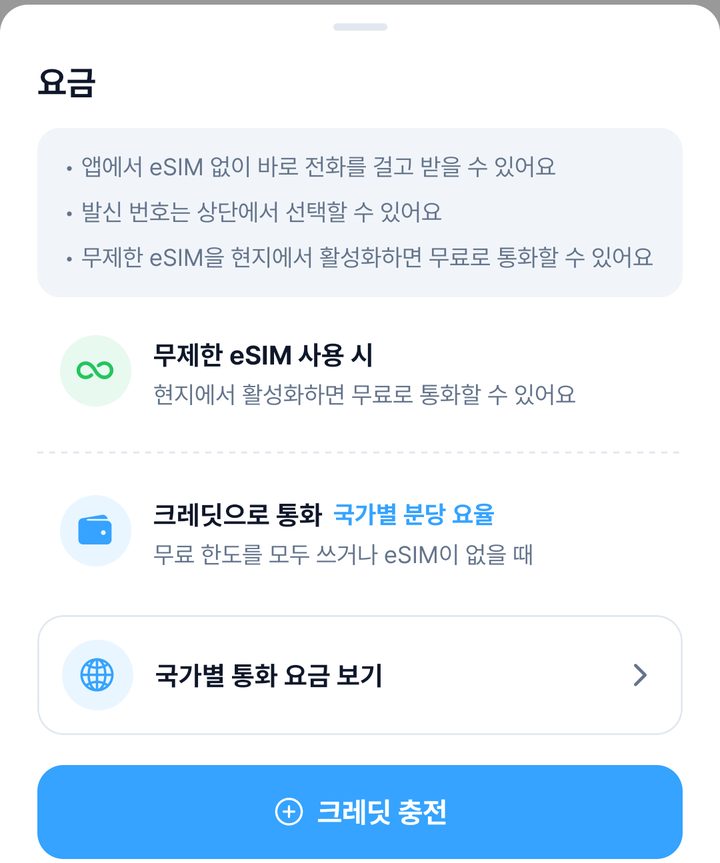
Call tab › ⓘ › Rates by country
4Frequently Asked Questions
5Important Notes
- TripTok calling is a feature available only in the TripTok app.
- As an internet-based (VoIP) service, a data or WiFi connection is required.
- Your verified Korean mobile number and the shared caller ID cannot receive calls or replies in TripTok.
- Rates vary by destination and landline or mobile type; check current country rates in the app.
- Free calling is included with an unlimited eSIM and becomes available after local activation.
- The recipient may see an international call label or hear a carrier warning.
- 050 proxy numbers and local emergency short codes are unsupported. Use your phone's default dialer in an emergency.
- Free number issuance and free call minutes are separate benefits. Check country, term, and price before issuing a number.
- App-to-app calls between reachable TripTok users are free. Switching to a regular phone call uses free minutes or credits.